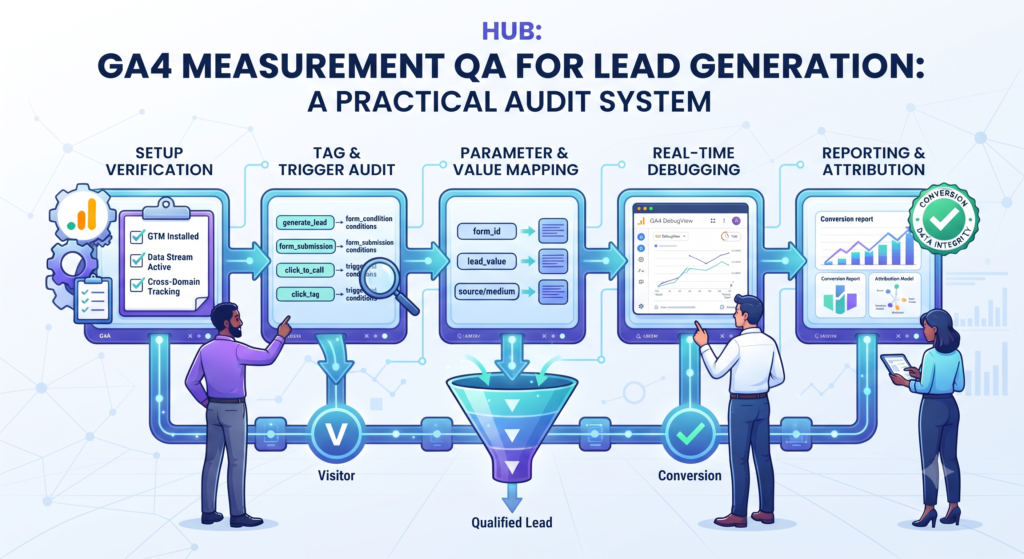
GA4 lead generation measurement QA checks whether recorded events describe the actions your business intended to measure. A tag firing successfully is one check. A confirmed enquiry, a correctly defined key event, and a usable comparison with CRM data are separate checks.
Start with one valuable journey, such as a demo request. Follow the action from the website through the data layer, tagging configuration, Analytics collection, and CRM acceptance. Record the differences rather than assuming every system should show the same total.
Define success before inspecting tags
Write an acceptance definition for the journey. A form button click indicates intent; a successful submission indicates a different event. A sales-accepted lead is later still. Choose which behavior each measurement represents and identify the system that confirms it.
Google’s event documentation explains event collection and parameters. Your own event specification should connect that mechanism to a precise business outcome.
Create an event contract
Document the event name, trigger, required parameters, destination, and owner. Identify any enhanced measurement, plugin, theme, or GTM implementation already sending similar events. Use a single event taxonomy so a redesign does not silently change the meaning of a report.
Keep sensitive fields out of analytics payloads. Names, email addresses, phone numbers, and free-text enquiries can leak through URLs, page titles, or custom parameters even when the main form integration is correct.
Test real journeys and exceptions
- A valid submission should produce the intended success event.
- A failed validation should not be counted as a completed enquiry.
- A refresh or repeated click should follow the documented counting rule.
- A duplicate submission should be understood at the enquiry level.
- Allowed and denied consent states should behave as configured.
- A slow or rejected destination should create an inspectable exception.
Use synthetic data and a test environment where possible. Google’s DebugView guidance helps inspect debug-enabled events. Also inspect the browser request and application confirmation; a report view alone cannot establish what happened upstream.
Investigate duplicate collection
Audit every sender for the important event. Common paths to investigate include a hard-coded tag plus GTM, multiple containers, a form plugin plus a custom listener, and repeated listeners after navigation. Use the duplicate event audit to identify the actual sender before disabling anything.
Do not hide collection errors by dividing report totals. Fix the trigger or installation, record the release date, and annotate the period affected by the issue.
Govern key events and ad conversions
Agree which actions matter to business reporting and which conversions should influence advertising optimization. Google distinguishes Analytics key events from advertising conversions. The connection does not remove differences in settings or attribution.
Maintain a key event and conversion register covering purpose, counting assumptions, imports, and change ownership. A measurement used to inspect engagement need not automatically become a bidding signal.
Reconcile with the operational record
Compare GA4 and CRM totals using the same journey, period, and unit. Analytics events and unique CRM contacts are not equivalent. Examine timezone boundaries, repeat submissions, collection consent, rejected enquiries, and CRM deduplication.
| Output | Owner |
|---|---|
| Event specification | Marketing and implementation lead |
| Test evidence | QA or analytics owner |
| Exception register | CRM and workflow owner |
| Reporting definitions | Business reporting owner |
Keep QA active after launch
Repeat focused checks after form changes, plugin updates, consent changes, and tagging releases. Monitor expected event volume alongside accepted enquiries, and investigate changes against the deployment log.
Octazing’s analytics consulting can connect event design, GTM implementation, and CRM reconciliation. Explore Octazing to scope a measurement audit around your most important lead journey.