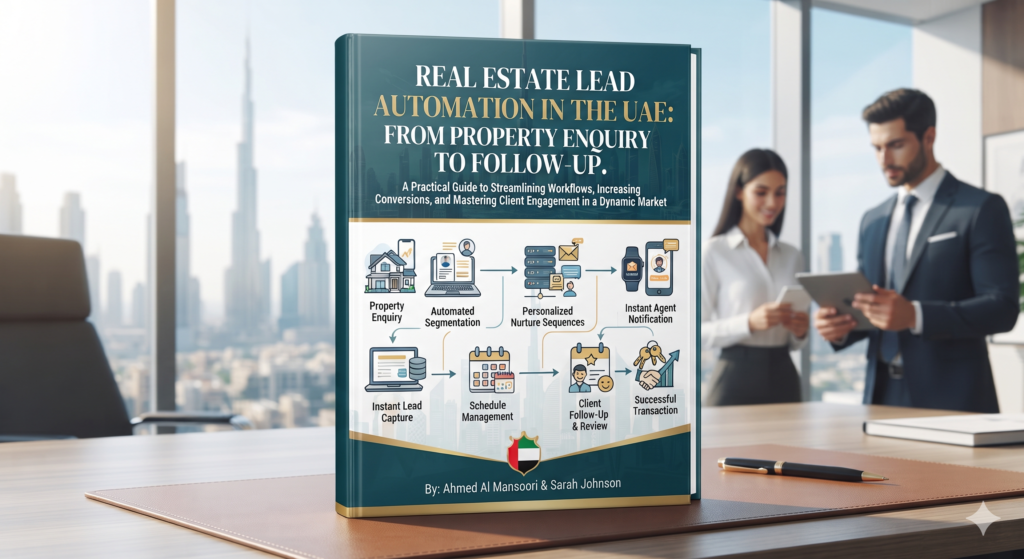
Real estate teams in the UAE can receive enquiries from listing portals, paid campaigns, social media, websites, referrals and direct calls. When each source has its own inbox or owner, it becomes difficult to see who is responding, what the buyer or investor is interested in, and what should happen next.
Real estate lead automation in the UAE can connect these steps. A well-designed workflow captures an enquiry, assigns it to the right team member, creates a clear follow-up task, updates the CRM and records the outcome for reporting. The aim is to make the process easier to manage while keeping agents in control of the conversation.
What real estate lead automation does
Lead automation uses rules to move enquiry information between approved channels, a CRM and reporting tools. It can help an agent, brokerage, developer or builder answer operational questions:
- Has the enquiry been recorded?
- Which project, listing, location or campaign does it relate to?
- Who owns the next response?
- Has the prospect been contacted?
- What outcome should be recorded?
Automation is useful for repetitive coordination. It should not make unsupported assumptions about a prospect’s budget, eligibility, intent or readiness to transact. Agents and sales teams should review the information and qualify enquiries through their normal process.
Why property enquiries get lost between channels
Different sources create separate records
A portal enquiry, website form and social media message may arrive in different systems. Without a consistent intake process, team members can miss a request or create duplicate records.
Ownership is unclear
If several agents share a project or territory, an enquiry may be forwarded without a named owner. A routing rule should assign responsibility and identify a backup when the owner is unavailable.
Follow-up is hard to see
A team may know that someone replied, but not whether a viewing was arranged, more information was requested or the prospect is waiting for a later follow-up. Clear CRM statuses make the next action visible.
Marketing reports do not show sales outcomes
Campaign dashboards can show clicks and form submissions, while CRM records hold the later sales activity. If the two are disconnected, teams may compare channels using incomplete information.
A practical lead automation workflow for UAE property teams
1. Standardise enquiry capture
List the sources the team wants to manage, such as website forms, portal enquiries, call tracking or approved campaign channels. Decide which fields are necessary to identify the enquiry and route it. Useful operational fields may include the project or listing, preferred contact method, source and assigned location or team.
Keep the intake form focused. Avoid collecting sensitive or unnecessary details simply because a field is available.
2. Route enquiries by project, location or team
Define assignment rules that reflect how the business is organised. For example, an enquiry can be routed by project, property type, language preference when explicitly provided, or sales territory. Include a fallback owner for records that do not match a rule.
Make the assignment visible in the CRM. A shared inbox can help with intake, but each enquiry should have a clear next owner.
3. Create follow-up tasks and reminders
When a new record arrives, automation can create a task for the assigned agent and notify the team through its chosen work channel. If the record remains without an outcome after the team’s defined interval, a reminder can prompt a review.
Set intervals around actual staffing and business processes. The purpose is to make follow-up dependable, not to promise a universal response time.
4. Use simple, shared CRM statuses
Choose a small set of stages the whole team understands. A starting set might include:
- New
- Assigned
- Contact attempted
- Contacted
- Viewing or meeting planned
- Nurture or follow-up later
- Closed or disqualified
Define when a record moves between statuses and who is responsible for updating it. Keep the stages aligned with the team’s real sales process rather than adding a long list that agents will not maintain.
5. Record outcomes and keep source information
When an agent updates a lead, preserve the original source and campaign information where available. Record outcomes using consistent definitions, such as contact made, viewing planned or no response. This gives managers a clearer view of the journey from first enquiry to sales activity.
Where data is missing or cannot be matched confidently, show it as unknown instead of guessing. Reliable reporting depends on visible gaps as much as complete records.
Example workflows
Listing enquiry to agent assignment
A listing enquiry arrives through an approved channel. The workflow creates or updates a CRM record, associates it with the listing where possible, assigns the responsible agent and creates a follow-up task. The agent then reviews the enquiry, contacts the prospect and records the outcome.
New development enquiry to project team
A campaign form identifies the relevant development or project. The workflow routes the record to the appropriate sales team, stores the campaign source and alerts the assigned owner. If the record cannot be matched to a project, it goes to a review queue instead of being silently discarded.
Unresolved enquiry to a manager review
If a record remains in a new or assigned status beyond the team’s chosen interval, the system can remind its owner or flag it for a manager. The reminder should stop once the CRM shows a recognised outcome.
How to measure lead management and marketing performance
A useful report combines marketing activity with CRM outcomes the team can verify. Consider tracking:
- Enquiries by source, project and location
- Records with an assigned owner
- Follow-up outcomes by source
- Viewings or meetings recorded in the CRM
- Time between enquiry capture and the first recorded action, when timestamps are reliable
- Duplicate, incomplete or unassigned records
Use these measures to find process gaps and compare channels with care. A click, form submission, conversation and completed transaction are different events. Define each one before using it to evaluate campaign performance or make budget decisions.
Roll out automation in stages
Start with one project, team or enquiry source. Map the current process, choose the CRM fields and statuses, agree on assignment rules, and test the workflow with sample records. Ask agents to use it and report where tasks, notifications or fields are confusing.
Once the pilot is working, review exceptions and data quality before expanding to more projects or channels. Keep a clear way for staff to correct a record, reassign ownership or pause a workflow when an unusual case needs human attention.
Review data access, retention, messaging permissions and vendor settings with the appropriate internal or professional advisers. Use only approved integrations and make sure the team understands what information is shared between systems.
How Octazing can help
Octazing works with businesses on marketing workflow automation, lead management automation, CRM and marketing automation, marketing reporting and data pipelines. For a UAE real estate team, the work can begin with mapping enquiry sources and handoffs, then defining routing, CRM updates and reporting around the tools already in use.
A workflow review can help identify where records are duplicated, ownership is unclear or sales outcomes are missing from marketing reports. The scope should fit the brokerage, developer or builder’s process and the systems it has chosen.
Read Octazing’s related guide, The 5-Minute Rule in Real Estate: Why Your Lead Response Time Matters, for a focused look at response workflows. To discuss lead management, CRM automation or reporting, explore Octazing’s services.
Frequently asked questions
What is real estate lead automation?
It is the use of connected rules and workflows to capture property enquiries, assign ownership, create follow-up tasks, update CRM records and report outcomes.
Who can use property lead automation?
Brokerages, individual real estate agents, property developers and builders can use automation when they need a more consistent way to manage enquiries across listings, projects, teams or marketing channels.
Does lead automation replace real estate agents?
No. It can support intake, reminders and record updates. Agents remain responsible for understanding a prospect’s needs, answering questions, arranging viewings and managing the relationship.
What should a real estate CRM track?
Track only the information the team needs to manage enquiries and sales activity. Common operational fields include source, project or listing, owner, current status, next action and recorded outcome. Keep definitions consistent across the team.
How should UAE real estate teams choose a lead automation system?
Start with the current process and systems. Check whether the setup can capture the sources the team uses, route records correctly, support the chosen CRM stages, provide useful reporting and meet the business’s data and access requirements. Test with one workflow before expanding.