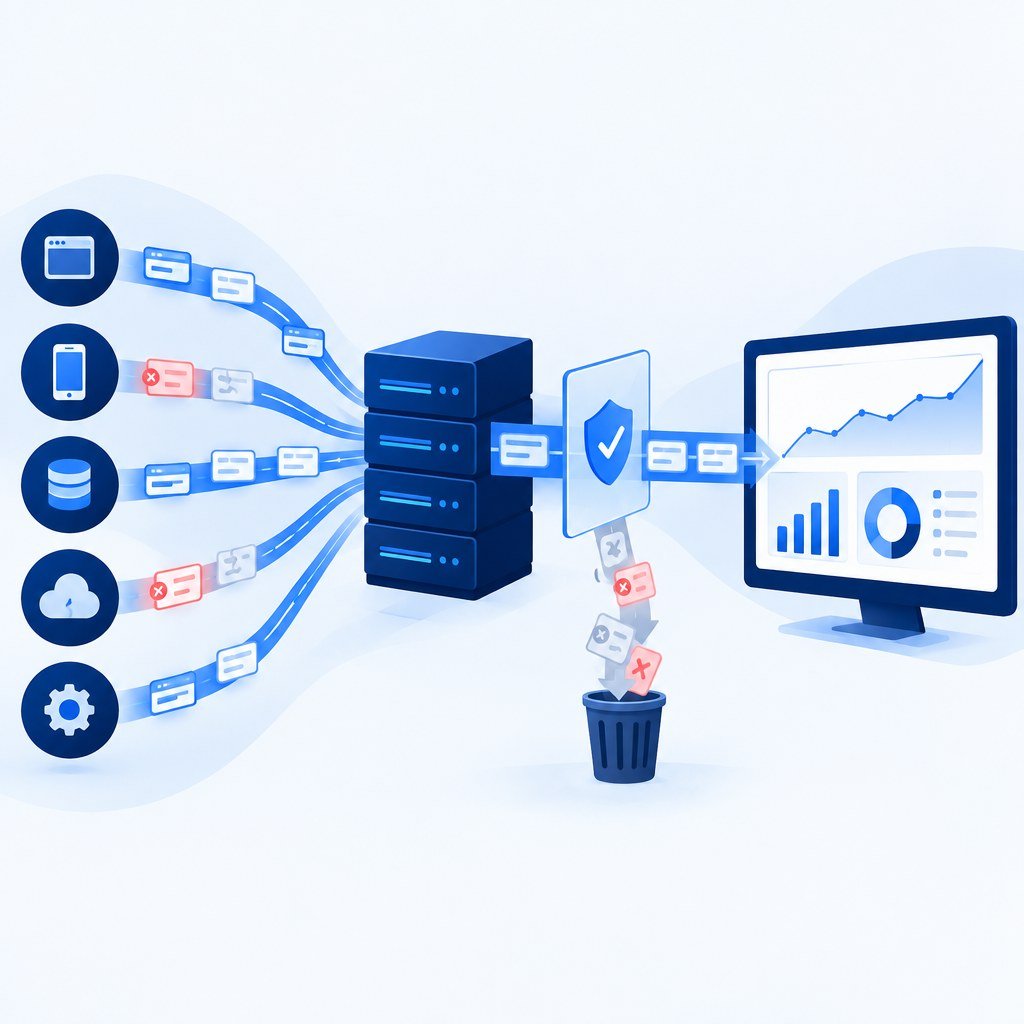
Server-side tagging gives you a processing layer between your event sources and marketing platforms. It can help you validate and control what you send. It does not repair an event that never arrived, identify every visitor, or make a tracking implementation automatically compliant.
However, a dangerous misconception is spreading across boardrooms and marketing teams: the idea that simply migrating to a server-side container (like Google Tag Manager Server-Side) will automatically heal broken conversion tracking.
The reality is that Server-Side Tagging is an architecture, not a magic wand. Moving your tracking to a server is the foundation, but if the data flowing through that server is flawed, you are simply scaling your inaccuracies. In this guide, we’ll explore why server-side tagging alone isn’t enough and what you actually need to do to achieve reliable, compliant conversion data.
The Server-Side Mirage: Why Migration Isn’t the Destination
When businesses implement Server-Side Tagging, they often focus entirely on the infrastructure: setting up the Google Cloud Platform (GCP) or AWS environment, configuring the custom domain, and mapping tags.
Moving tags changes the delivery architecture. Browser restrictions can still affect browser-originated events. If your data layer or event definitions are inconsistent, forwarding those events through a server preserves the problem.
The Three Pillars of Data Integrity
To fix your conversion data, you must look beyond the server. You need to address the three pillars of high-fidelity tracking:
- Data Collection Quality: The accuracy of the signals captured at the browser level.
- Data Enrichment: The ability to append missing context (like CRM identifiers or user-agent details).
- Data governance: Apply an explicit allowlist of fields and respect the purpose and consent settings for each destination.
Why Your Server-Side Setup Might Still Be Leaking Data
Even with a perfectly configured Server-Side Tagging environment, your conversion data can remain incomplete. Here are the three primary reasons why.
1. The Client-Side Signal Gap
A common web implementation sends events from the browser to a server container. If that browser request is blocked or never fires, the container receives nothing. Events originating in your backend or CRM use a different path, which also needs validation and monitoring.
Check required fields against each destination’s specification. For a GA4 purchase event, inspect transaction_id, value, and currency. Confirm that the correct event fires once for the intended business action.
2. Inadequate Identity Resolution
Identifiers can help a destination match an event to an eligible ad interaction. A server container does not create identity by itself. Decide which identifiers you actually have, whether they are appropriate to send, and how each destination expects them to be formatted.
Where permitted and supported, customer-provided information can supplement conversion measurement. Do not invent missing identifiers or assume that hashing makes customer information anonymous. Limit collection and sharing to the agreed purpose.
3. The “Blocking” Paradox
Server-side delivery does not override a visitor’s choices. For Google’s server-side consent mode implementation, the web container communicates consent state to the server, and supported Google tags adjust their behaviour. Custom and third-party tags need their own checks. Test accepted, rejected, and changed preferences.
- Governance risk: Data may be sent in ways that conflict with your collection policy or the user’s choices.
- Data Discrepancies: You are comparing “server-side” numbers against “client-side” dashboard numbers that were already filtered for consent, leading to massive reporting headaches.
How to Actually Fix Your Conversion Data
If Server-Side Tagging is the vessel, your data quality is the cargo. Here is how you optimize the cargo.
1. Standardize Your Data Layer
Before moving to server-side, audit your current data layer. Are you using a standardized naming convention (like GA4’s ecommerce schema)? If you send order_total to one pixel and value to another, you create fragmentation. Implement a rigid Data Layer Specification that serves as the “single source of truth.”
2. Leverage Server-Side Enrichment
This is the “secret weapon” of server-side tagging. Because your server container sits between your website and your ad platforms, you can manipulate data in real-time:
- CRM context: Add an eligible sales outcome or business identifier when the destination supports it. Keep actual transaction value separate from estimated lifetime value.
- Validation: Reject malformed events and record why they failed, without logging unnecessary customer details.
- Data Cleansing: Remove PII (like email addresses in URLs) before they hit Facebook’s servers.
3. Implement Enhanced Conversions
Google Ads enhanced conversions supplement existing measurement with hashed first-party customer data. Matching depends on available information and platform requirements; it is not a guarantee of complete attribution. Follow Google’s setup and customer-data policies, then validate the implementation.
The Role of Analytics Monitoring
Tracking is not a “set it and forget it” task. Even with a server-side setup, data quality decays over time. At Octazing, we treat tracking as an ongoing product, not a one-time project.
- Audit Regularly: Perform a quarterly audit of your GTM containers.
- Monitor API Health: Ensure your Conversions APIs (Meta, Google, TikTok) are reporting healthy match rates.
- Validate Data Mapping: Ensure that as your business changes, your server-side mappings are updated accordingly.
Don’t let bad data dictate your growth strategy.
Contact the Octazing experts today for a comprehensive server-side infrastructure audit.
Conclusion: Moving Beyond the Infrastructure
Server-Side Tagging is a massive technological leap forward. But do not fall into the trap of believing that the migration itself solves your conversion data woes. Fixing your data requires a holistic approach: cleaning your data layer, enriching signals, governing compliance, and monitoring performance.