# The ‘Hidden Leak’: Fixing CRM Sync Latency with n8n Orchestration
In the high-stakes world of B2B demand generation, speed is not just a competitive advantage—it is the foundation of conversion. Yet, even companies with million-dollar tech stacks suffer from a “hidden leak” that drains their pipeline every single day. This leak isn’t caused by poor ad copy or bad targeting; it is caused by the 15-minute “sync gap” between a prospect clicking “submit” and a sales representative receiving a notification. While your marketing automation platform and CRM perform their scheduled handshake, your prospect has already moved on to a competitor’s website.
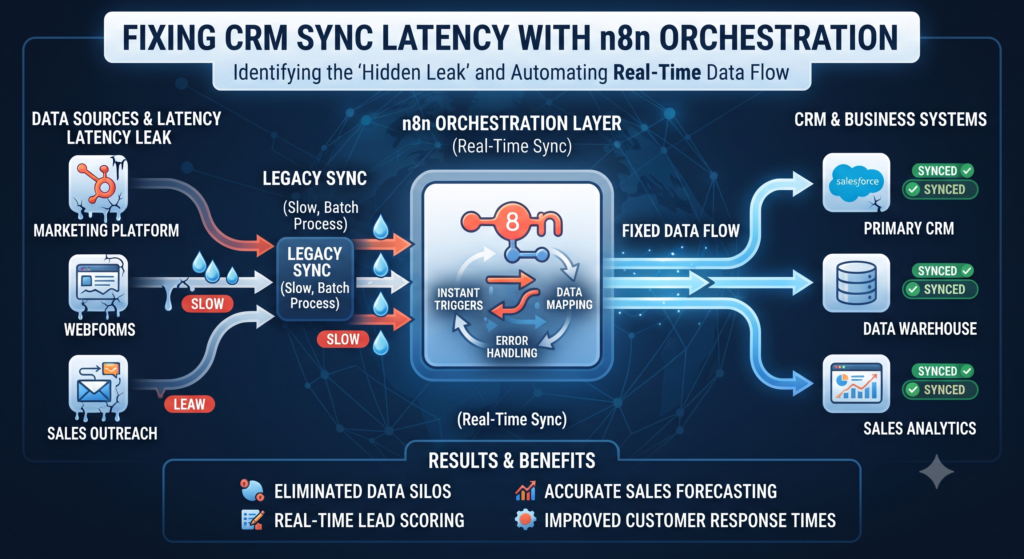
To plug this leak, modern revenue teams are moving away from traditional, rigid integrations and toward a more agile **Lead Ops OS**. By leveraging **n8n workflow automation**, organizations can bypass the inherent **CRM sync latency** that plagues standard MarTech stacks. The goal is simple: hit sub-2-minute response times by triggering instant alerts the millisecond a lead hits your database. In this guide, we explore how to build a parallel orchestration layer that ensures no lead goes cold while waiting for a CRM refresh.
## The 15-Minute Death Valley: Understanding Lead Leakage
The “15-minute Death Valley” refers to the period where a lead exists in your database but is invisible to your sales team. Most native integrations between form builders (like Typeform or LinkedIn Gen Forms) and CRMs (like Salesforce or HubSpot) rely on polling or batched synchronization. Even under optimal conditions, these syncs often occur every 10 to 15 minutes. In the mind of a B2B buyer, 15 minutes is an eternity. Research consistently shows that the odds of qualifying a lead drop by 10x if the initial contact happens after the first five minutes.
This delay results in significant **lead leakage**. When a prospect submits a demo request, they are in a state of high intent. They are thinking about your solution and their specific pain points. If your system is bogged down by latency, that intent evaporates. By the time a rep calls 20 minutes later, the prospect is likely back in a meeting, driving, or—worse—on a discovery call with a competitor who responded faster.
Building a robust **Lead Ops OS** requires acknowledging that the standard “out-of-the-box” sync is insufficient for high-velocity sales. To maintain high **data fidelity**, you need a system that captures and acts on intent data in real-time. This isn’t just about speed; it’s about preserving the momentum of the buyer’s journey. When you allow a lead to sit in a sync queue, you are essentially throwing away the premium you paid for that lead’s attention.
## Why Standard CRM Syncs Fail
Most B2B organizations rely on native “Connectors” provided by their CRM vendors. While these connectors are easy to set up, they are built for stability and bulk data transfer, not for instantaneous action. These systems often experience **CRM sync latency** due to API rate limits and governor limits. If your marketing site generates a high volume of leads during a webinar or a major campaign launch, the CRM may throttle the incoming data, pushing sync times even further out.
Furthermore, standard syncs are often sequential. A lead must first be created in the Marketing Automation Platform (MAP), then enriched by a third-party tool, and finally pushed to the CRM. Only after the CRM accepts the record can a workflow trigger an email or a Slack notification to the sales rep. Each of these steps introduces a “hop” that adds seconds or minutes to the total time-to-alert.
In a complex MarTech environment, this sequential dependency is a single point of failure. If the enrichment service is slow, the entire lead routing process stalls. This is where **MarTech orchestration** becomes critical. Instead of a linear chain, we need a hub-and-spoke model where data is distributed to multiple destinations simultaneously. By moving toward a model that incorporates **server-side attribution**, we can ensure that lead data is not just fast, but also accurately mapped to the original source without relying on the slow, client-side browser hooks that CRMs typically use.
## The Solution: Building a Parallel n8n Workflow
The most effective way to eliminate the sync gap is to build a parallel processing track. While the “official” record of truth is being slowly constructed in your CRM, a lightweight, high-speed workflow handles the immediate notification. This is where **n8n workflow automation** excels. n8n is a low-code tool that allows you to connect disparate systems via webhooks and APIs with minimal overhead.
In this architecture, your website form doesn’t just send data to your CRM; it sends a webhook to n8n. n8n acts as the central nervous system of your **Lead Ops OS**. Because n8n can process data in milliseconds, it can send an “Instant Alert” to a Slack channel or via SMS to a territory manager long before the CRM record has even been assigned an ID.
This parallel approach ensures that the sales team has the prospect’s name, company, and intent data on their screen within seconds. This allows for a “near-instant” follow-up. Meanwhile, in the background, n8n can continue to interact with your **conversion API** and other **closed-loop measurement** tools to ensure that the attribution data is being recorded accurately. By decoupling the notification from the CRM sync, you gain the benefits of a structured database without the penalty of its latency.
## How to Set Up the “Instant Alert” Trigger
Setting up an instant alert trigger in n8n is a straightforward process that yields massive ROI. The workflow begins with a Webhook Node. Most modern form builders (Typeform, Webflow, or custom React forms) can fire a POST request to a specific URL the moment a form is submitted. This is the “trigger” that kicks off the parallel track.
Once the data hits n8n, you can use a series of nodes to clean and format the information. For example, you might use a “Set” node to map the form fields to readable labels. You can also include a quick look-up in a secondary database or an enrichment tool like Clearbit or Apollo. Because n8n handles these requests asynchronously, the total processing time usually remains under two seconds.
The final step in the “Instant Alert” workflow is the notification node. Most teams choose Slack or Microsoft Teams. The notification should include a “Quick Action” link—perhaps a link to the prospect’s LinkedIn profile or a direct “Click-to-Dial” phone number. By providing the rep with all the necessary context immediately, you remove the friction of them having to search for the lead in the CRM later. This process maintains high **data fidelity** because the rep is acting on the raw, original submission data while it is still fresh.
## Bypassing the CRM Lag for Speed-to-Lead
Achieving a sub-2-minute **speed-to-lead** requires a cultural shift as much as a technical one. When the sales team knows that an n8n alert is truly “instant,” their behavior changes. They stop treating lead follow-up as a task to be cleared at the end of the hour and start treating it as a live “ping” that requires immediate attention.
Bypassing the CRM lag also allows for more sophisticated **closed-loop measurement**. When a rep connects with a lead within 90 seconds of a form fill, the conversion rate from “MQL to Discovery Call” typically skyrockets. By logging these fast-response interactions back into your system via n8n, you can clearly see the correlation between response time and pipeline velocity.
This setup also enables better **server-side attribution**. Because the n8n workflow captures the lead’s IP address, GCLID, and other metadata at the moment of submission—and stores it or sends it to a **conversion API** immediately—you avoid the data loss that occurs when users close their browsers or clear their cookies before a traditional CRM sync can complete. You are essentially creating a high-fidelity snapshot of the conversion event that is independent of the CRM’s internal processing speed.
## Integrating n8n into your Lead Ops OS
A truly modern **Lead Ops OS** is not just a collection of tools; it is an integrated strategy for managing the entire lifecycle of a lead. Integrating n8n into this OS means using it as the orchestration layer that sits between your demand gen activities and your sales execution. It ensures that every component of your stack—from your **conversion API** to your email sequences—is working in harmony.
One of the greatest strengths of using n8n for **MarTech orchestration** is its ability to handle complex logic that CRMs struggle with. For example, you can build logic that checks if a lead is from an “Existing Customer” or a “Target Account” before sending the alert. If the lead is a high-value target, n8n can trigger an automated SMS to the Account Executive; if it’s a low-value student or researcher, it can simply route them to a nurture sequence.
By centralizing these rules in n8n, you make your **Lead Ops OS** more flexible. If you decide to switch CRMs or add a new enrichment tool, you only need to update the workflow in n8n, rather than reconfiguring dozens of native integrations. This modularity is key to maintaining a high-performance revenue engine in an environment where tech stacks are constantly evolving.
## FAQ
### What is CRM sync latency?
**CRM sync latency** is the time delay between a data event (like a form submission) and that data being available and actionable within your CRM. This is often caused by API batching, rate limits, or sequential processing in marketing automation platforms.
### How does n8n improve speed-to-lead?
n8n improves **speed-to-lead** by using webhooks to trigger actions the millisecond a lead is captured. By running a parallel workflow, n8n can send notifications to sales teams in seconds, bypassing the 10-15 minute delay typical of standard CRM integrations.
### Can n8n work alongside my existing Salesforce or HubSpot setup?
Yes. n8n is designed for **MarTech orchestration**. It doesn’t replace your CRM; it works alongside it. It handles the “hot” data for immediate action while your CRM handles the “cold” data for long-term storage and reporting.
### Why is server-side attribution important for Lead Ops?
**Server-side attribution** ensures that you capture marketing source data (like ad IDs and click identifiers) directly from the server rather than relying on the prospect’s browser. This leads to higher **data fidelity** and more accurate **closed-loop measurement**, especially with increasing privacy restrictions on cookies.
### Is n8n difficult to set up for a marketing team?
n8n is a low-code tool, meaning it requires some technical understanding of APIs and webhooks but does not require deep programming knowledge. It is increasingly becoming a core tool for Lead Ops professionals who want more control over their data flows.
## Conclusion
The 15-minute sync gap is a silent killer of B2B conversion rates. By the time your CRM has finished its routine synchronization, the window of opportunity has often closed. Implementing a **Lead Ops OS** powered by **n8n workflow automation** allows you to reclaim those lost minutes and turn **lead leakage** into pipeline growth.
By building a parallel orchestration track, you ensure that your sales team is alerted the instant a high-intent prospect raises their hand. This approach doesn’t just improve your **speed-to-lead**; it enhances your entire data ecosystem through **server-side attribution** and robust **closed-loop measurement**. Stop letting your most valuable leads sit in a sync queue. Orchestrate your data, empower your sales team, and close the gap between intent and action.
*Ready to eliminate the sync gap and optimize your revenue stack? Octazing specializes in building high-performance Lead Ops OS frameworks that turn technical hurdles into competitive advantages. Contact us today to see how we can orchestrate your MarTech for maximum velocity.*